[Template Action] [Main Benefit] for [Target Audience]
by
[Your Company]
250
Enter a 1–2 sentence overview summarizing what this template does and who it helps. Focus on the core value proposition and include relevant keywords to grab attention quickly.
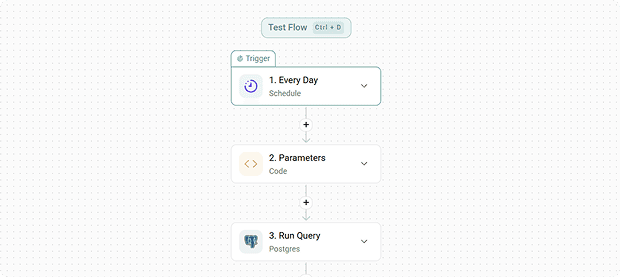


Easy to use
Immediate value
Always updated
AI enabled
This is where you provide a comprehensive overview of your template. Start with a paragraph that introduces the specific problem your template solves and who will benefit the most from using it. You want to give the user enough context to immediately understand why this tool is valuable to their workflow.
In the second paragraph, explain exactly how the template functions behind the scenes. Mention what kinds of data it processes, where that data comes from (e.g., specific integrations, manual input, or uploaded CSVs), and what the final output looks like. Keep the tone helpful, professional, and encouraging to entice them to duplicate it.
Features
[Core Feature Name]: Describe the primary functionality or tool included in the template and how it works.
[Data Integration/Automation]: Explain what external data sources or automated workflows are built into this page.
[Visual Dashboard/Chart]: Detail the specific charts, tables, or visual summaries the user will see.
[Customizable Metric]: Mention how users can tweak or filter the data to match their specific needs.
Benefits
Save Time on [Task]: Explain how this template eliminates manual, repetitive grunt work for the user.
Gain Actionable Insights: Describe how the organized data helps the user make smarter, faster decisions.
Centralize Your Data: Highlight the convenience of having multiple data streams unified in one clean layout.
Easy Collaboration: Mention how easily this layout can be shared with team members or external clients.
Setup
Click on the Use template button: Clicking the "Use template" button will enable the template in your Solved-hub account.
Connect API: Connect the API from [Integration]. You can find more information below.
Customize your layout: Add or remove rows and columns to tailor the template metrics to your specific business goals.
Categories
Forms
Integrations
Shopify
[Template Action] [Main Benefit] for [Target Audience]
by
[Your Company]
250
Enter a 1–2 sentence overview summarizing what this template does and who it helps. Focus on the core value proposition and include relevant keywords to grab attention quickly.
Easy to use
Immediate value
Always updated
AI enabled
This is where you provide a comprehensive overview of your template. Start with a paragraph that introduces the specific problem your template solves and who will benefit the most from using it. You want to give the user enough context to immediately understand why this tool is valuable to their workflow.
In the second paragraph, explain exactly how the template functions behind the scenes. Mention what kinds of data it processes, where that data comes from (e.g., specific integrations, manual input, or uploaded CSVs), and what the final output looks like. Keep the tone helpful, professional, and encouraging to entice them to duplicate it.
Features
[Core Feature Name]: Describe the primary functionality or tool included in the template and how it works.
[Data Integration/Automation]: Explain what external data sources or automated workflows are built into this page.
[Visual Dashboard/Chart]: Detail the specific charts, tables, or visual summaries the user will see.
[Customizable Metric]: Mention how users can tweak or filter the data to match their specific needs.
Benefits
Save Time on [Task]: Explain how this template eliminates manual, repetitive grunt work for the user.
Gain Actionable Insights: Describe how the organized data helps the user make smarter, faster decisions.
Centralize Your Data: Highlight the convenience of having multiple data streams unified in one clean layout.
Easy Collaboration: Mention how easily this layout can be shared with team members or external clients.
Setup
Click on the Use template button: Clicking the "Use template" button will enable the template in your Solved-hub account.
Connect API: Connect the API from [Integration]. You can find more information below.
Customize your layout: Add or remove rows and columns to tailor the template metrics to your specific business goals.
Categories
Forms
Integrations
Shopify
[Template Action] [Main Benefit] for [Target Audience]
by
[Your Company]
250
Enter a 1–2 sentence overview summarizing what this template does and who it helps. Focus on the core value proposition and include relevant keywords to grab attention quickly.
Easy to use
Immediate value
Always updated
AI enabled
This is where you provide a comprehensive overview of your template. Start with a paragraph that introduces the specific problem your template solves and who will benefit the most from using it. You want to give the user enough context to immediately understand why this tool is valuable to their workflow.
In the second paragraph, explain exactly how the template functions behind the scenes. Mention what kinds of data it processes, where that data comes from (e.g., specific integrations, manual input, or uploaded CSVs), and what the final output looks like. Keep the tone helpful, professional, and encouraging to entice them to duplicate it.
Features
[Core Feature Name]: Describe the primary functionality or tool included in the template and how it works.
[Data Integration/Automation]: Explain what external data sources or automated workflows are built into this page.
[Visual Dashboard/Chart]: Detail the specific charts, tables, or visual summaries the user will see.
[Customizable Metric]: Mention how users can tweak or filter the data to match their specific needs.
Benefits
Save Time on [Task]: Explain how this template eliminates manual, repetitive grunt work for the user.
Gain Actionable Insights: Describe how the organized data helps the user make smarter, faster decisions.
Centralize Your Data: Highlight the convenience of having multiple data streams unified in one clean layout.
Easy Collaboration: Mention how easily this layout can be shared with team members or external clients.
Setup
Click on the Use template button: Clicking the "Use template" button will enable the template in your Solved-hub account.
Connect API: Connect the API from [Integration]. You can find more information below.
Customize your layout: Add or remove rows and columns to tailor the template metrics to your specific business goals.
Categories
Forms
Integrations
Shopify
[Template Action] [Main Benefit] for [Target Audience]
by
[Your Company]
250
Enter a 1–2 sentence overview summarizing what this template does and who it helps. Focus on the core value proposition and include relevant keywords to grab attention quickly.
Easy to use
Immediate value
Always updated
AI enabled
This is where you provide a comprehensive overview of your template. Start with a paragraph that introduces the specific problem your template solves and who will benefit the most from using it. You want to give the user enough context to immediately understand why this tool is valuable to their workflow.
In the second paragraph, explain exactly how the template functions behind the scenes. Mention what kinds of data it processes, where that data comes from (e.g., specific integrations, manual input, or uploaded CSVs), and what the final output looks like. Keep the tone helpful, professional, and encouraging to entice them to duplicate it.
Features
[Core Feature Name]: Describe the primary functionality or tool included in the template and how it works.
[Data Integration/Automation]: Explain what external data sources or automated workflows are built into this page.
[Visual Dashboard/Chart]: Detail the specific charts, tables, or visual summaries the user will see.
[Customizable Metric]: Mention how users can tweak or filter the data to match their specific needs.
Benefits
Save Time on [Task]: Explain how this template eliminates manual, repetitive grunt work for the user.
Gain Actionable Insights: Describe how the organized data helps the user make smarter, faster decisions.
Centralize Your Data: Highlight the convenience of having multiple data streams unified in one clean layout.
Easy Collaboration: Mention how easily this layout can be shared with team members or external clients.
Setup
Click on the Use template button: Clicking the "Use template" button will enable the template in your Solved-hub account.
Connect API: Connect the API from [Integration]. You can find more information below.
Customize your layout: Add or remove rows and columns to tailor the template metrics to your specific business goals.
Categories
Forms
Integrations
Shopify
[Template Action] [Main Benefit] for [Target Audience]
by
[Your Company]
250
Enter a 1–2 sentence overview summarizing what this template does and who it helps. Focus on the core value proposition and include relevant keywords to grab attention quickly.
Easy to use
Immediate value
Always updated
AI enabled
This is where you provide a comprehensive overview of your template. Start with a paragraph that introduces the specific problem your template solves and who will benefit the most from using it. You want to give the user enough context to immediately understand why this tool is valuable to their workflow.
In the second paragraph, explain exactly how the template functions behind the scenes. Mention what kinds of data it processes, where that data comes from (e.g., specific integrations, manual input, or uploaded CSVs), and what the final output looks like. Keep the tone helpful, professional, and encouraging to entice them to duplicate it.
Features
[Core Feature Name]: Describe the primary functionality or tool included in the template and how it works.
[Data Integration/Automation]: Explain what external data sources or automated workflows are built into this page.
[Visual Dashboard/Chart]: Detail the specific charts, tables, or visual summaries the user will see.
[Customizable Metric]: Mention how users can tweak or filter the data to match their specific needs.
Benefits
Save Time on [Task]: Explain how this template eliminates manual, repetitive grunt work for the user.
Gain Actionable Insights: Describe how the organized data helps the user make smarter, faster decisions.
Centralize Your Data: Highlight the convenience of having multiple data streams unified in one clean layout.
Easy Collaboration: Mention how easily this layout can be shared with team members or external clients.
Setup
Click on the Use template button: Clicking the "Use template" button will enable the template in your Solved-hub account.
Connect API: Connect the API from [Integration]. You can find more information below.
Customize your layout: Add or remove rows and columns to tailor the template metrics to your specific business goals.
Categories
Forms
Integrations
Shopify
[Template Action] [Main Benefit] for [Target Audience]
by
[Your Company]
250
Enter a 1–2 sentence overview summarizing what this template does and who it helps. Focus on the core value proposition and include relevant keywords to grab attention quickly.
Easy to use
Immediate value
Always updated
AI enabled
This is where you provide a comprehensive overview of your template. Start with a paragraph that introduces the specific problem your template solves and who will benefit the most from using it. You want to give the user enough context to immediately understand why this tool is valuable to their workflow.
In the second paragraph, explain exactly how the template functions behind the scenes. Mention what kinds of data it processes, where that data comes from (e.g., specific integrations, manual input, or uploaded CSVs), and what the final output looks like. Keep the tone helpful, professional, and encouraging to entice them to duplicate it.
Features
[Core Feature Name]: Describe the primary functionality or tool included in the template and how it works.
[Data Integration/Automation]: Explain what external data sources or automated workflows are built into this page.
[Visual Dashboard/Chart]: Detail the specific charts, tables, or visual summaries the user will see.
[Customizable Metric]: Mention how users can tweak or filter the data to match their specific needs.
Benefits
Save Time on [Task]: Explain how this template eliminates manual, repetitive grunt work for the user.
Gain Actionable Insights: Describe how the organized data helps the user make smarter, faster decisions.
Centralize Your Data: Highlight the convenience of having multiple data streams unified in one clean layout.
Easy Collaboration: Mention how easily this layout can be shared with team members or external clients.
Setup
Click on the Use template button: Clicking the "Use template" button will enable the template in your Solved-hub account.
Connect API: Connect the API from [Integration]. You can find more information below.
Customize your layout: Add or remove rows and columns to tailor the template metrics to your specific business goals.
Categories
Forms
Integrations
Shopify
Similar templates
[Template Action] [Main Benefit] for [Target Audience]
by
[Your Company]
Enter a 1–2 sentence overview summarizing what this template does and who it helps. Focus on the core value proposition and include relevant keywords to grab attention quickly.
Forms
Shopify
250
Balance automation
by
Solved
This workflow automates financial oversight by synchronizing real-time data between your banking APIs (or Stripe/PayPal) and your accounting software.
Flows
Forms
Dashboard
Minimax
e-računi
Metakocka
300
[Template Action] [Main Benefit] for [Target Audience]
by
[Your Company]
Enter a 1–2 sentence overview summarizing what this template does and who it helps. Focus on the core value proposition and include relevant keywords to grab attention quickly.
Forms
Shopify
250
Balance automation
by
Solved
This workflow automates financial oversight by synchronizing real-time data between your banking APIs (or Stripe/PayPal) and your accounting software.
Flows
Forms
Dashboard
Minimax
e-računi
Metakocka
300
[Template Action] [Main Benefit] for [Target Audience]
by
[Your Company]
Enter a 1–2 sentence overview summarizing what this template does and who it helps. Focus on the core value proposition and include relevant keywords to grab attention quickly.
Forms
Shopify
250
Balance automation
by
Solved
This workflow automates financial oversight by synchronizing real-time data between your banking APIs (or Stripe/PayPal) and your accounting software.
Flows
Forms
Dashboard
Minimax
e-računi
Metakocka
300
